Giving Every AI Framework Real-World Tools: LangChain, MCP, Virtuals, and Beyond
 J Nicolas
Every major AI framework has its own way of defining tools. LangChain uses BaseTool subclasses. The Model Context Protocol uses a JSON-RPC server with typed schemas. Virtuals GAME uses plugin classes with an execute method. If you want your agent to send an email, you write that integration once per framework, which means you write it four times if you work across four frameworks.
OneShot is a set of real-world tools for AI agents: email, voice calls, SMS, web research, verification, and more, all paid for with USDC via the x402 protocol. OneShot ships adapters for the major frameworks so you write the agent logic once and drop it into whichever runtime you are using. This article walks through what those adapters look like and how to set them up.
The Fragmentation Problem
If you have built agents across more than one framework, you have felt this. LangChain agents expect tools that subclass BaseTool and implement a _run method. Claude's tool use expects JSON schema objects passed in the API request. MCP-compatible hosts like Claude Desktop or Cursor expect a running server that speaks the Model Context Protocol over stdio or HTTP. Virtuals GAME expects plugin objects with a specific interface for on-chain gaming agents.
None of these are wrong choices. They reflect real differences in how each system works. But the result is that "give my agent the ability to send an email" is not a five-minute task. It is a five-minute task per framework, and the implementations drift apart over time.
The adapter pattern OneShot uses is straightforward: there is one backend API that handles the actual tool execution and billing, and thin framework-specific wrappers translate each framework's interface into calls to that API. You configure your API key once, and the same tools show up in whatever surface you are building on.
The Core SDK
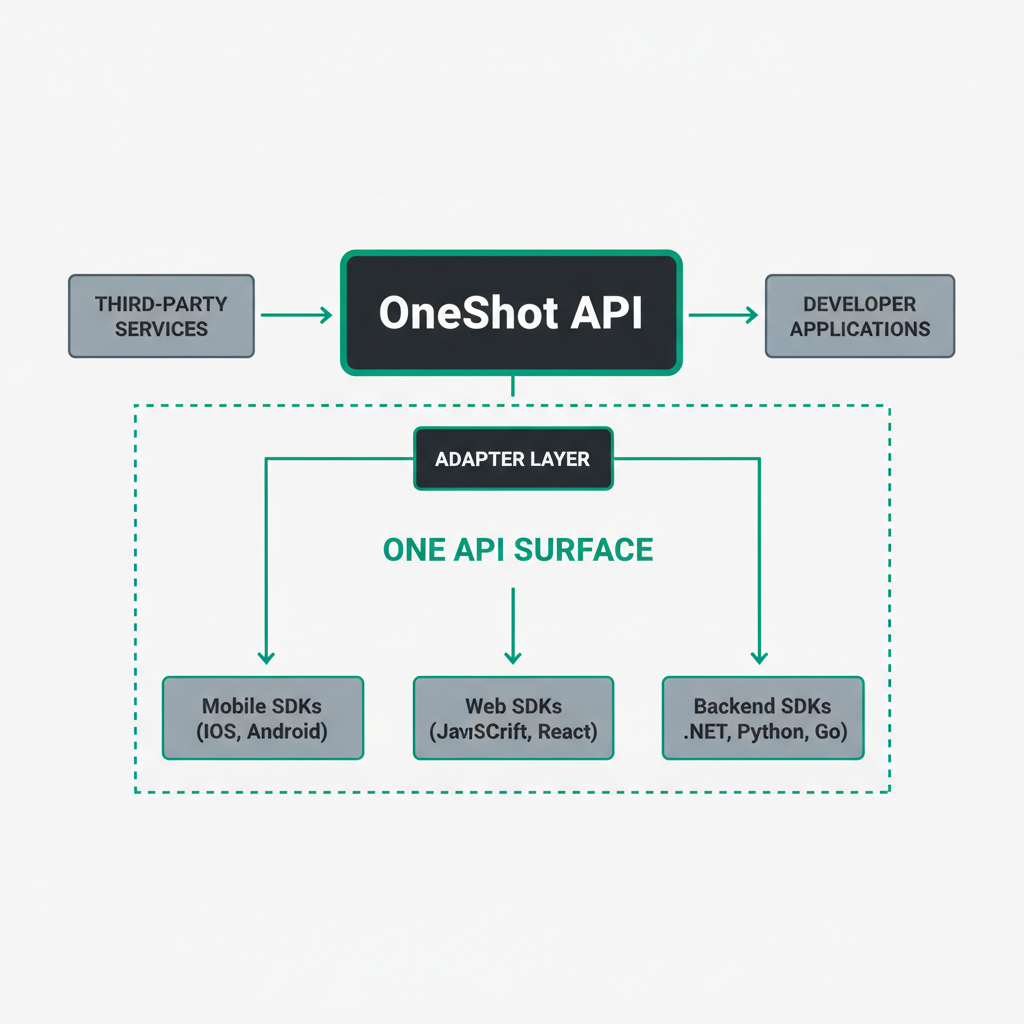
Before looking at framework-specific adapters, it helps to understand the base layer. The OneShot SDK on npm is a TypeScript package that wraps the OneShot API directly. You can use it in any Node.js environment without any framework at all.
import { OneShotClient } from "@oneshot-agent/sdk";

const client = new OneShotClient({ apiKey: process.env.ONESHOT_API_KEY });

const result = await client.tools.email.send({
  to: "recipient@example.com",
  subject: "Agent-generated summary",
  body: "Here is the research your agent compiled.",
});

console.log(result.messageId);
That call deducts a small USDC amount from your agent's balance and returns a receipt. The SDK overview docs cover all available tools and their parameters. The framework adapters below are built on top of this same client.
LangChain Integration
LangChain's tool interface is well-documented and widely used. A custom LangChain tool is a class that subclasses BaseTool, declares a name and description, and implements _run. The description is what the LLM reads when deciding whether to use the tool, so it matters.
Here is a minimal LangChain tool that wraps OneShot's email capability:
from langchain.tools import BaseTool
from pydantic import BaseModel, Field
import httpx
import os

class EmailInput(BaseModel):
    to: str = Field(description="Recipient email address")
    subject: str = Field(description="Email subject line")
    body: str = Field(description="Plain text email body")

class OneShotEmailTool(BaseTool):
    name = "send_email"
    description = (
        "Send an email to a specified address. "
        "Use this when the user asks you to notify someone or "
        "deliver a result via email."
    )
    args_schema = EmailInput

    def _run(self, to: str, subject: str, body: str) -> str:
        response = httpx.post(
            "https://api.oneshotagent.com/v1/tools/email/send",
            headers={"Authorization": f"Bearer {os.environ['ONESHOT_API_KEY']}"},
            json={"to": to, "subject": subject, "body": body},
        )
        response.raise_for_status()
        data = response.json()
        return f"Email sent. Message ID: {data['messageId']}"

    async def _arun(self, to: str, subject: str, body: str) -> str:
        async with httpx.AsyncClient() as client:
            response = await client.post(
                "https://api.oneshotagent.com/v1/tools/email/send",
                headers={"Authorization": f"Bearer {os.environ['ONESHOT_API_KEY']}"},
                json={"to": to, "subject": subject, "body": body},
            )
            response.raise_for_status()
            data = response.json()
            return f"Email sent. Message ID: {data['messageId']}"
You then pass an instance of OneShotEmailTool() to your agent's tool list. The same pattern works for OneShot's other tools: web research, SMS, voice calls, and identity verification. Each one becomes a BaseTool subclass with a schema that matches the API parameters.
The description field is worth spending time on. LangChain agents use it to decide when to invoke the tool. "Send an email" is too vague. Something like "Send an email to a specific address when you need to deliver results, notifications, or follow-ups outside the current conversation" gives the model enough context to make a good decision.
MCP Server Setup

The Model Context Protocol is an open standard for connecting AI models to external tools and data sources. Hosts like Claude Desktop, Cursor, and Zed can connect to MCP servers and expose their tools to the model automatically. You do not write any tool-calling code in your application. The host handles it.
OneShot ships a ready-made MCP server as @oneshot-agent/mcp-server on npm. Installing it takes about two minutes.
First, install the package globally:
npm install -g @oneshot-agent/mcp-server
Then add it to your MCP host's configuration. For Claude Desktop, open ~/Library/Application Support/Claude/claude_desktop_config.json and add:
{
  "mcpServers": {
    "oneshot": {
      "command": "oneshot-mcp",
      "env": {
        "ONESHOT_API_KEY": "your_api_key_here"
      }
    }
  }
}
Restart Claude Desktop. OneShot's tools now appear in the tool list automatically. Claude can send emails, run web research, or initiate a voice call without you writing any tool-calling logic. The full configuration options are in the MCP setup guide.
For Cursor, the setup is similar. Cursor reads MCP server configurations from ~/.cursor/mcp.json using the same format. Once connected, the tools are available in Cursor's agent mode.
The MCP approach is useful when you want to add real-world capabilities to an existing host without modifying application code. You are configuring infrastructure, not writing an integration.
Virtuals GAME Plugin
Virtuals Protocol is a platform for on-chain AI agents, mostly in gaming and interactive entertainment contexts. Its GAME framework (Generative Autonomous Multimodal Entities) uses a plugin system where each capability is a class with a defined interface.
A OneShot plugin for GAME looks like this in TypeScript:
import { OneShotClient } from "@oneshot-agent/sdk";

const client = new OneShotClient({ apiKey: process.env.ONESHOT_API_KEY });

export const oneShotEmailPlugin = {
  name: "send_email",
  description: "Send an email to a player or external address",
  parameters: {
    type: "object",
    properties: {
      to: { type: "string", description: "Recipient email address" },
      subject: { type: "string", description: "Email subject" },
      body: { type: "string", description: "Email body text" },
    },
    required: ["to", "subject", "body"],
  },
  execute: async (params: { to: string; subject: string; body: string }) => {
    const result = await client.tools.email.send(params);
    return { success: true, messageId: result.messageId };
  },
};
You register this plugin with your GAME agent instance. The agent can then decide to send an email as part of its action sequence, paying for the call from its USDC balance. For gaming agents that need to notify players, send receipts, or communicate outside the game environment, this is a direct path to real-world output.
Choosing the Right Adapter
The right adapter depends on where your agent runs, not on personal preference.
- If you are building a Python agent with LangChain, write
BaseToolsubclasses. The Python ecosystem around LangChain is mature and the tool interface is stable. - If you want Claude Desktop or Cursor to have access to real-world tools without writing application code, install the MCP server and configure it in your host's JSON file. This is the lowest-friction option for development and prototyping.
- If you are building on Virtuals GAME for on-chain agents, use the plugin interface. The USDC payment model fits naturally with on-chain economics.
- If you are working in a framework not listed here, the raw OneShot API is a standard REST API. Any HTTP client works.
Getting Started
The fastest path to a working setup is the MCP server if you use Claude Desktop or Cursor. Install @oneshot-agent/mcp-server, add four lines to your config file, and restart the host. You will have email, research, SMS, and voice available in minutes.
For programmatic use, install the SDK from npm, grab an API key from the OneShot dashboard, and follow the code examples above for whichever framework you are using. The source for all adapters is on the OneShot GitHub if you want to see exactly what each wrapper does before using it.
Tool costs are pay-per-use with no monthly minimums. You can find the per-tool pricing on the pricing page before committing anything. A good first test is a research call followed by an email: run a web research query, take the result, and have the agent email it somewhere. That covers two tools, confirms billing works, and gives you something concrete to show.