Building a Voice Call Agent: Real-Time Speech, Telephony, and Error Recovery
 J Nicolas
A voice AI agent that introduces 2.3 seconds of silence before responding feels broken to the person on the other end. They'll assume the call dropped, say "hello?" again, and the interaction unravels. Getting real-time speech right in telephony is a latency problem first, an accuracy problem second, and a reliability problem third. Most teams get the order wrong.
This article walks through the architecture of a production voice call agent: the audio pipeline, the latency budget at each stage, how to handle the failure modes that kill demos but rarely show up in documentation, and what the full cost stack looks like per call minute. The code examples use OneShot's voice SDK, which handles telephony lifecycle from dial-out through hangup detection, but the architectural patterns apply to any stack.
The Audio Pipeline: What Actually Happens Between "Ring" and "Response"
When an AI agent places or receives a phone call, audio moves through five distinct stages before the agent can say anything back. Understanding where latency accumulates at each stage is the only way to hit a target that feels conversational.
Stage one is telephony transport. A SIP trunk converts PSTN audio to RTP packets, typically G.711 codec (8kHz, 64kbps), which arrive at your media server every 20ms. G.711 adds about 20ms of packetization delay on top of network transit. If you're using a cloud telephony provider, add another 30-80ms for their infrastructure hop. Total for this stage: 50-100ms.
Stage two is audio buffering and VAD (voice activity detection). You can't send audio to a speech-to-text model mid-word and expect good results. A VAD system like WebRTC's built-in detector or Silero VAD watches the audio stream and signals when the speaker has finished a phrase. Typical end-of-speech detection adds 300-500ms of deliberate silence padding to avoid cutting off sentences. This is usually the biggest single contributor to perceived latency, and it's mostly unavoidable without accepting more transcription errors.
Stage three is STT transcription. Streaming STT (Deepgram, AssemblyAI, Whisper with chunked streaming) can return partial results in under 200ms for short utterances. Full transcription of a 5-second sentence runs 150-400ms depending on model and infrastructure proximity.
Stage four is LLM reasoning. With a 100-200 token input and 50-100 token output, GPT-4o or Claude 3.5 Haiku return first tokens in 300-600ms. Streaming the response starts TTS before the full completion arrives, which is the main lever for cutting total latency.
Stage five is TTS synthesis and audio playout. Neural TTS (ElevenLabs, Cartesia, Azure Neural) streaming first audio chunk in 150-300ms. The audio then travels back through the SIP trunk to the caller.
The 800ms Budget: Where It Actually Goes
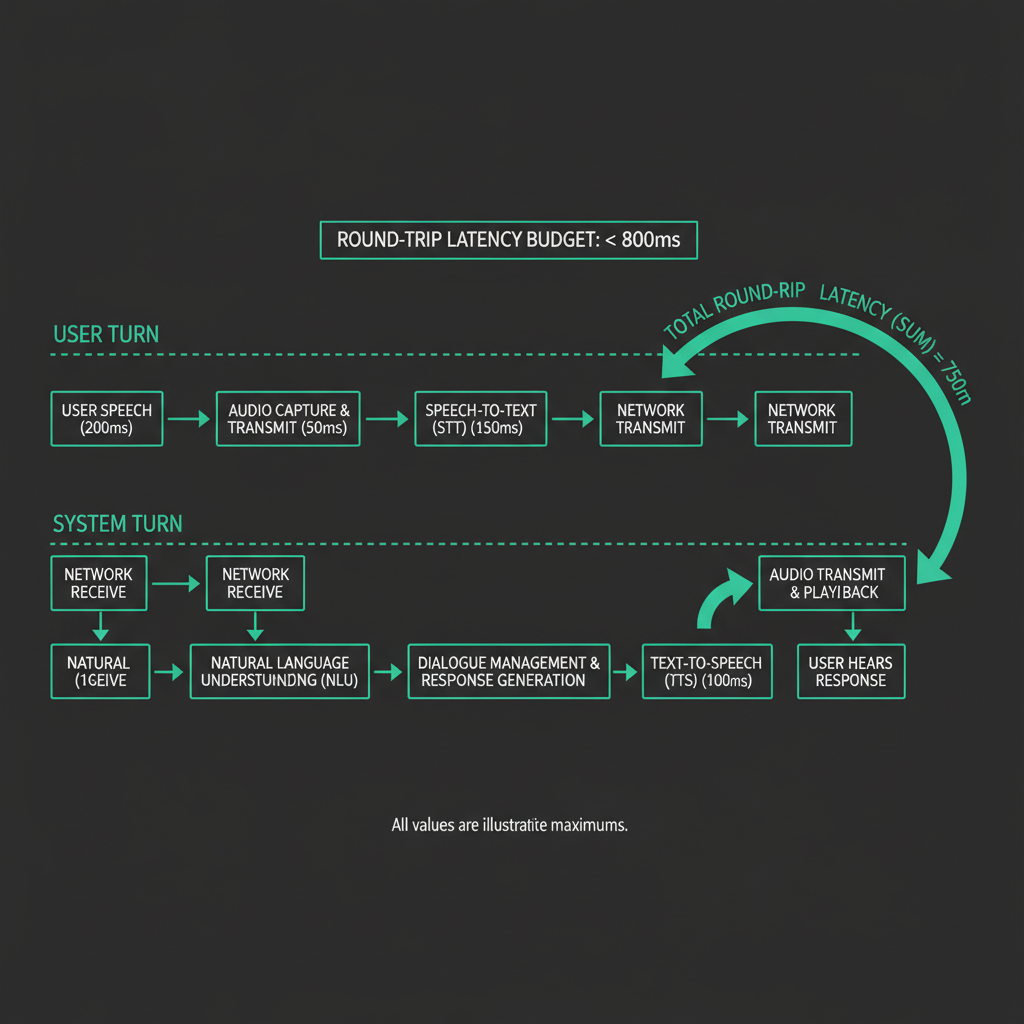
800ms end-to-end is the threshold where conversation feels natural. Above 1.2 seconds, callers start filling silence. Here's a realistic budget for a low-latency stack:
Stage                    Budget (ms)    Notes
------------------------------------------------------
Telephony inbound        60             SIP trunk + network
VAD silence padding      300            Minimum viable; 400ms safer
STT streaming            180            Partial transcript, short utterance
LLM first token          220           Streamed; start TTS immediately
TTS first chunk          150            Streaming synthesis
Telephony outbound       60             RTP back to caller
------------------------------------------------------
Total                    970ms          Tight but achievable
970ms is over budget. The places to cut: reduce VAD padding from 300ms to 250ms (accept ~5% more clipped utterances), use a smaller LLM for routing decisions and only invoke the large model for complex responses, and choose a TTS provider with sub-100ms first-chunk latency. Cartesia's Sonic model consistently hits 80-120ms to first audio byte in benchmark conditions. With these changes, you can land at 750-850ms on median calls.
The tail matters too. P95 latency on cloud STT can spike to 800ms during traffic bursts. Build a fallback: if STT hasn't returned within 600ms of end-of-speech signal, play a filler phrase ("one moment") while waiting. This is not a hack; it's how human customer service reps handle processing time.
WebSocket Audio Streams: The Plumbing
Most telephony platforms (Twilio, Vonage, Bandwidth) expose audio via WebSocket streams. The agent connects, receives raw audio frames, and sends audio back on the same or a separate socket. Here's the core loop using the OneShot SDK:
import { OneShotClient } from '@oneshot-agent/sdk';
import { createVADProcessor } from './vad';
import { StreamingSTT } from './stt';
import { StreamingTTS } from './tts';

const client = new OneShotClient({ apiKey: process.env.ONESHOT_API_KEY });

async function handleCallSession(callId: string) {
  const call = await client.voice.getCall(callId);
  const audioStream = await call.openAudioStream();

  const vad = createVADProcessor({ silencePaddingMs: 280 });
  const stt = new StreamingSTT({ provider: 'deepgram', model: 'nova-2' });
  const tts = new StreamingTTS({ provider: 'cartesia', voiceId: 'YOUR_VOICE_ID' });

  // Buffer incoming audio frames
  audioStream.on('audio', (frame: Buffer) => {
    vad.push(frame);
  });

  // VAD signals end-of-speech
  vad.on('utterance', async (audioChunk: Buffer) => {
    // Start STT immediately on complete utterance
    const transcript = await stt.transcribe(audioChunk);

    if (!transcript || transcript.trim().length === 0) return; // skip noise

    // Stream LLM response to TTS without waiting for full completion
    const llmStream = await client.llm.streamChat({
      messages: [{ role: 'user', content: transcript }],
      systemPrompt: call.agentConfig.systemPrompt,
    });

    const audioResponse = tts.streamFromText(llmStream);

    // Send TTS audio back to caller as it arrives
    audioResponse.on('chunk', (audioFrame: Buffer) => {
      audioStream.sendAudio(audioFrame);
    });

    audioResponse.on('end', () => {
      // Signal that agent has finished speaking; re-enable VAD
      vad.resume();
    });
  });

  // Handle call lifecycle events
  call.on('hangup', () => cleanup(audioStream, vad, stt, tts));
  call.on('error', (err) => handleCallError(err, call));
}
A few non-obvious things in this pattern. First, vad.resume() after TTS completes prevents the agent from transcribing its own audio output, which causes echo loops that are extremely difficult to debug in production. Second, the empty transcript check catches DTMF tones and background noise that VAD misclassifies as speech. Third, the LLM stream feeds directly into TTS without buffering the full response, which is how you get TTS starting within 300ms of the STT result.
IVR Navigation: The Problem Nobody Talks About
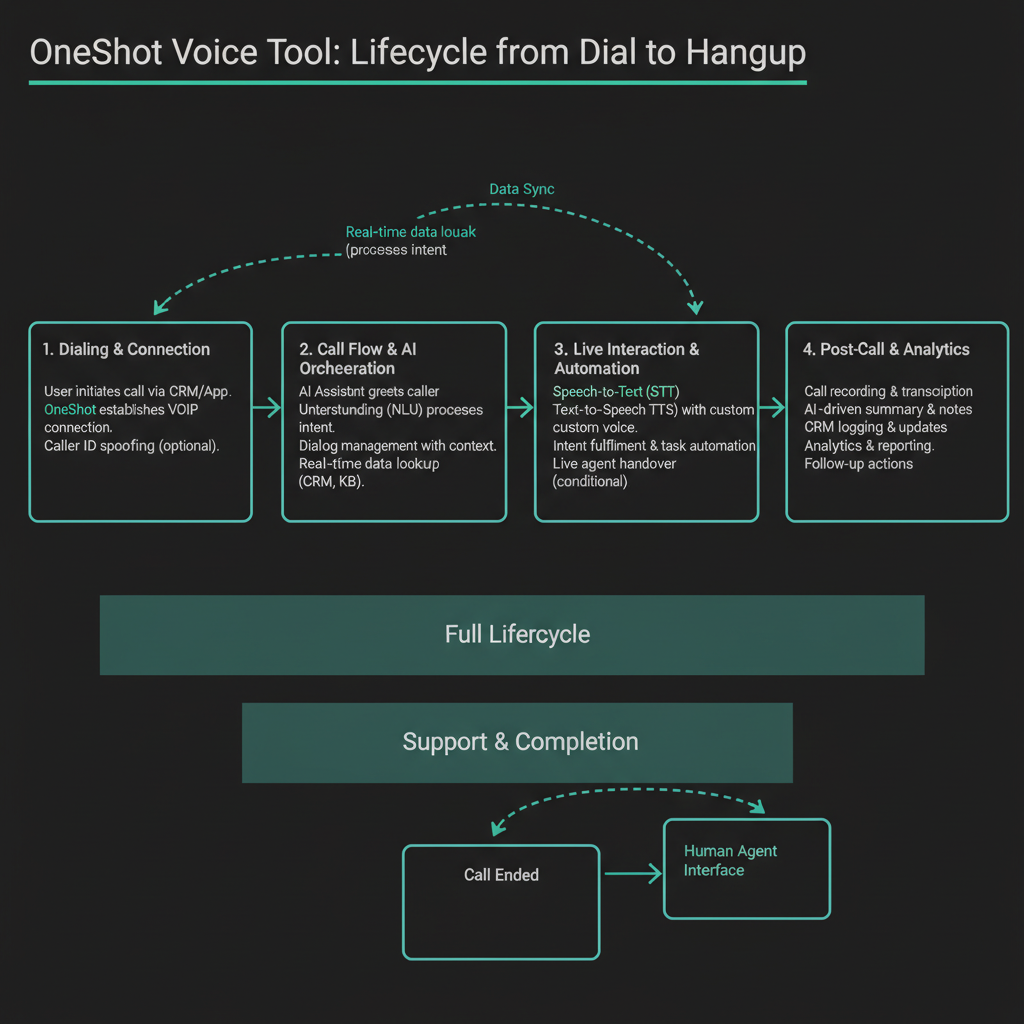
When an AI agent calls a company's customer service line, it doesn't reach a human for the first 2-4 minutes. It navigates an IVR tree. This is where most voice agent demos fall apart in production.
IVR systems behave in ways that are genuinely hard to handle:
- They speak over silence that the agent's VAD interprets as end-of-speech, causing premature responses that confuse the IVR.
- They use DTMF (keypad tones) for navigation, not natural language. The agent needs to send DTMF signals, not audio responses.
- They have timeouts. If the agent doesn't respond within 5 seconds, the IVR repeats the menu or hangs up.
- They sometimes play hold music that triggers VAD constantly, filling your STT queue with transcriptions of Kenny G.
The pattern that works in production is a state machine with IVR-specific modes. During IVR navigation, VAD sensitivity drops significantly (or disables entirely), and the agent operates on a script rather than free-form LLM responses. Once a human answers, the agent switches to the conversational pipeline.
type CallPhase = 'ivr_navigation' | 'hold' | 'human_conversation' | 'wrap_up';

class CallStateMachine {
  private phase: CallPhase = 'ivr_navigation';
  private ivrScript: IVRAction[];
  private scriptIndex = 0;

  constructor(private call: VoiceCall, script: IVRAction[]) {
    this.ivrScript = script;
  }

  async handleAudio(transcript: string) {
    switch (this.phase) {
      case 'ivr_navigation':
        await this.executeIVRStep(transcript);
        break;

      case 'hold':
        // Monitor for human pickup signal
        if (this.detectHumanVoice(transcript)) {
          this.phase = 'human_conversation';
          await this.call.sendAudio(this.getOpeningStatement());
        }
        break;

      case 'human_conversation':
        // Full LLM pipeline
        await this.handleHumanTurn(transcript);
        break;
    }
  }

  private async executeIVRStep(transcript: string) {
    const currentAction = this.ivrScript[this.scriptIndex];

    if (!currentAction) {
      this.phase = 'hold';
      return;
    }

    // Check if this IVR prompt matches what we expected
    const matches = await this.matchIVRPrompt(transcript, currentAction.expectedPrompt);

    if (matches) {
      if (currentAction.type === 'dtmf') {
        await this.call.sendDTMF(currentAction.key);
      } else if (currentAction.type === 'speech') {
        await this.call.sendAudio(currentAction.response);
      }
      this.scriptIndex++;
    } else {
      // IVR prompt didn't match script; use LLM to improvise
      await this.handleUnexpectedIVRPrompt(transcript);
    }
  }

  private detectHumanVoice(transcript: string): boolean {
    // Heuristic: IVR prompts are structured, human answers are not
    const humanIndicators = ['how can i help', 'what can i do', 'my name is', 'speaking'];
    return humanIndicators.some(phrase => transcript.toLowerCase().includes(phrase));
  }
}
The handleUnexpectedIVRPrompt method is where you invoke the LLM to interpret an IVR menu it hasn't seen before. This is expensive (300-600ms LLM call) but rare if your scripts are well-built. OneShot's voice tool maintains a library of IVR patterns for major carriers and companies, which means the LLM fallback fires less than 15% of the time on calls to large enterprises.
Error Recovery: Dropped Calls and Garbled Audio
Two failure modes will hit you in production that don't appear in testing.
The first is mid-conversation audio degradation. PSTN calls can develop packet loss mid-session, particularly on mobile-originated calls. Your STT starts returning fragments: "I need to... account... the... refund." The agent has two options: ask for clarification (which sounds robotic after two consecutive clarification requests) or infer from context and confirm. The inference-and-confirm pattern works better. The agent says "I want to make sure I have this right: you're looking for a refund on your account?" and the caller confirms or corrects. This handles 80% of degraded audio cases without making the interaction feel broken.
The second is unexpected hangups. The caller hangs up mid-sentence, the IVR disconnects after a timeout, or a network event kills the call. Your agent needs to detect this within 2-3 seconds and clean up resources cleanly. WebSocket close events are unreliable on PSTN bridges. The safer pattern is a heartbeat: if no audio frame arrives for 4 seconds and no hangup event fires, assume the call ended and trigger cleanup.
class CallHealthMonitor {
  private lastAudioTimestamp = Date.now();
  private heartbeatInterval: NodeJS.Timer;

  constructor(private call: VoiceCall, private onCallDead: () => void) {
    this.heartbeatInterval = setInterval(() => this.check(), 1000);
  }

  recordAudio() {
    this.lastAudioTimestamp = Date.now();
  }

  private check() {
    const silenceDuration = Date.now() - this.lastAudioTimestamp;

    if (silenceDuration > 4000 && this.call.status !== 'completed') {
      console.warn(`Call ${this.call.id}: no audio for ${silenceDuration}ms, assuming dead`);
      this.cleanup();
      this.onCallDead();
    }
  }

  cleanup() {
    clearInterval(this.heartbeatInterval);
  }
}
Cost Breakdown Per Call Minute
A voice agent call has four distinct cost components. Here's what a typical 8-minute customer service call costs (estimates based on published pricing as of mid-2025):
Component               Rate                    8-min call cost
------------------------------------------------------------------
Telephony (outbound)    $0.013/min              $0.104
STT (Deepgram Nova-2)   $0.0043/min             $0.034
TTS (Cartesia Sonic)    $0.065/1000 chars       ~$0.039 (600 chars/min)
LLM (GPT-4o)           $0.005/1K tokens        ~$0.080 (est. 16K tokens)
OneShot voice tool      see pricing             included in tool call
------------------------------------------------------------------
Total                                           ~$0.26/call-minute
                                                ~$2.08 for 8-min call
LLM cost is the most variable. If the call involves complex reasoning, multi-turn context, or tool calls (looking up account information, checking order status), token count climbs fast. A call that requires five tool invocations might use 40K tokens total, pushing LLM cost to $0.20 for that call alone. The mitigation is aggressive context compression: summarize earlier turns rather than sending the full transcript, and route simple confirmations through a smaller model like GPT-4o-mini ($0.00015/1K tokens) rather than the full model.
The OneShot pricing page covers how the voice tool cost fits into per-call economics, including the USDC payment model that lets agents pay for calls autonomously without human billing intervention.